What Is a Smart Home? Juniper Cove's Package Explained
In this article
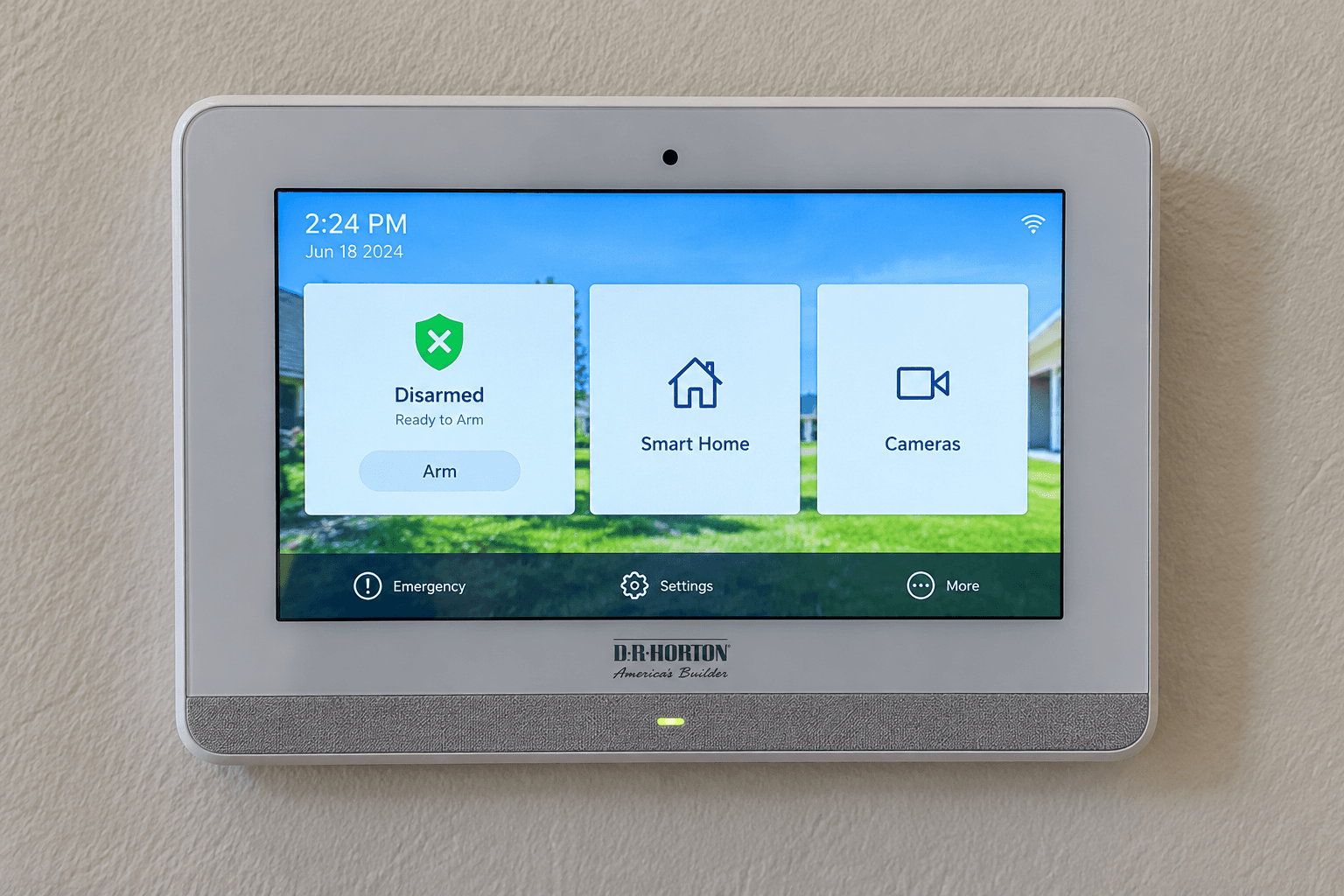
What is a smart home? It is a home where the lock, lights, thermostat and doorbell are connected. You can check and control them from a wall screen or a phone app. The devices can also work together, like turning on a light when you unlock the door. At Juniper Cove, D.R. Horton includes a smart home package called Home Is Connected in every home, per its features sheet.
Here is what that means in plain words, what each device does, and how to keep it all safe.

What Is a Smart Home, in Plain Words?
A regular home has switches and keys. You have to be there to use them. A smart home adds a small radio or Wi-Fi link to some of those things. Now they can take orders from a hub or an app, and they can report back.
That gives you three simple powers:
Check. Is the garage door shut? Did someone ring the bell?
Control. Lock the door, change the temperature or turn off a light from somewhere else.
Connect. Set things to happen together, like a ""leaving"" setting that locks up and turns off the lights.
A smart home is not about gadgets for their own sake. It is about fewer ""did I lock it?"" moments.
How the Devices Talk: Z-Wave Explained
Many smart devices use Wi-Fi, the same internet signal your phone uses. Others use Z-Wave, a wireless language made just for home devices. Juniper Cove's thermostat, light switch and door lock are all Z-Wave devices, per the features sheet.
The Z-Wave Alliance describes it as a low-powered radio technology that supports full mesh networks. A mesh network means devices can pass messages along to each other, so a signal can reach the far side of the house. The same page says Z-Wave uses a different radio band from common 2.4 GHz Wi-Fi (the radio channel many home routers use), so that Wi-Fi does not get in its way.
In short: Z-Wave devices talk to a hub, and the hub talks to you. At Juniper Cove, the hub is the touchscreen panel on the wall.
What Comes in Juniper Cove's Smart Home Package
D.R. Horton's Juniper Cove features sheet lists these items under Home Is Connected:
Device | What it does for you |
|---|---|
Qolsys IQ Panel II, 7"" HD touchscreen with a built-in 5MP camera | The hub on the wall. You control the other devices from here |
ADC 750 Wi-Fi video doorbell | A doorbell with a camera, so you can see who is at the front door |
Z-Wave thermostat | Lets you change the air conditioning from the panel or an app |
Z-Wave light switch | Lets you turn that light on or off without walking to it |
Z-Wave door lock | Lets you lock or check the door from the panel or an app |
Wi-Fi garage door opener with two transmitters | Connects to your Wi-Fi so it can work with an app; the two transmitters are handheld remotes |
The features sheet also lists Kwikset keyless entry, so you can get in without a key.
The sheet says included features can change without notice. Confirm what comes with the exact home you pick. Call 561-704-0091 and we will check it for you.
The ""smart-ready"" basics behind the scenes
A few items are not flashy, but they matter:
Square D surge protection on all major appliances. A surge is a quick spike of electricity, like during a lightning storm. Surge protection helps shield your appliances from it.
Pre-wired for ceiling fans with switches in all bedrooms and the great room. Adding a fan later is simpler when the wiring is already there.
Smoke detectors with battery back-up and a carbon monoxide detector, both from BRK.

What Is a Smart Home Like Day to Day?
Here is how it can feel in real life.
Morning. You leave for work and wonder if you shut the garage. With the opener set up in the app, you can check instead of driving back.
Midday. A delivery comes. The video doorbell lets you see who is at the door.
Afternoon. It is a hot day. You set the thermostat so the house is cool when you get home.
Weekend. You spend the day out at the Everglades Alligator Farm. The doorbell lets you see the front door, and you can check that the door is locked.
See how much room each garage really has in 2 car garage dimensions.
Keep Your Smart Home Safe
Anything connected to the internet needs a little care. The Federal Trade Commission gives simple advice for securing your internet-connected devices at home. The main points:
Change default usernames and passwords on every device and app.
Turn on two-factor login where you can. That means a second code, often sent to your phone.
Update your devices and apps when updates come out.
Turn off or disconnect what you do not use.
Your home Wi-Fi router is the front door to all of this. The FTC also explains how to secure your home Wi-Fi network, including turning on encryption and changing the router's default settings.
Questions to Ask Before You Buy
Smart home packages come with some fine print. Ask these before you sign:
Is there a monthly fee? Some features, like app access or professional monitoring, may need a paid plan. Ask what is included and what costs extra.
Who sets it up? D.R. Horton's sheet lists a personalized new homeowner orientation. Ask if the smart home is part of it.
Can I add more devices later? Ask which brands and types will work with the panel.
What happens if the internet goes down? Know how to use your lock and garage door by hand.
How Smart Features Fit the Rest of the Home
The smart package is one part of a full list of standard features. Juniper Cove homes also come with impact windows and impact sliding glass doors, per the features sheet. The floors are Mohawk RevWood laminate outside the bedrooms. Read more in laminate vs vinyl flooring.
About Juniper Cove
Juniper Cove is a D.R. Horton Express Series community in Homestead, in Miami-Dade County, on the east side of SW 192nd Avenue. It has eight plans. The three townhomes are the Jade, Opal and Topaz. The five single-family plans run up to the five-bedroom Robie.
Townhomes have recently started around the low $400,000s, and the Robie in the low $600,000s. Call 561-704-0091 for today's numbers. Compare every plan in Juniper Cove floor plans compared, or see the Juniper Cove community page.
Try the Smart Home in Person
The best way to understand a smart home is to tap the screen yourself. Ask us to show you the panel, the doorbell and the lock on a real home, and ask what incentives are available today.
Call 561-704-0091 or Try Juniper Cove's smart home — Schedule a Visit.

Common Questions
What is a smart home in simple terms?
A smart home has devices like the lock, lights, thermostat and doorbell connected to a hub or an app. You can check and control them from a screen or your phone, and set them to work together.
What smart home features come with a Juniper Cove home?
D.R. Horton's features sheet lists a Qolsys IQ Panel II touchscreen and an ADC 750 Wi-Fi video doorbell. It also lists a Z-Wave thermostat, light switch and door lock, plus a Wi-Fi garage door opener with two remotes. Features can change, so confirm on your home.
What is Z-Wave?
Z-Wave is a wireless language made for home devices. The Z-Wave Alliance describes it as a low-powered radio technology that supports mesh networks, where devices pass signals along to each other.
Does a smart home need a monthly subscription?
Sometimes. App access or professional monitoring may need a paid plan, depending on the service. Ask what is included with the home and what would cost extra before you buy.
Are smart home devices safe from hackers?
They are safer when you take a few steps. The FTC advises changing default passwords, using two-factor login, updating devices and turning off what you do not use.
Can I control my Juniper Cove home from my phone?
That is the idea. The doorbell and garage door opener are Wi-Fi devices, and the Z-Wave lock, thermostat and light switch connect to the wall panel. Ask us to show you how the app works during your visit.
See it working for yourself. Call 561-704-0091 or book a Juniper Cove smart home demo.
Related reading: Impact Windows: What Juniper Cove Homes Include · Laminate vs Vinyl Flooring: What Juniper Cove Uses · Juniper Cove Floor Plans: All Eight Homes Compared · 2 Car Garage Dimensions: Real Sizes at Juniper Cove · Everglades Alligator Farm: A Guide From Juniper Cove · Juniper Cove community page